Keyquill

Type a few keys.
Get the whole reply.

Keyquill turns shortcuts like ;thx into full emails, replies and templates, in any text box on the web. Private by design: no account, and your snippets never leave your browser.

Unlimited snippets on the free plan. No tracking, no ads, no AI pop-ups.

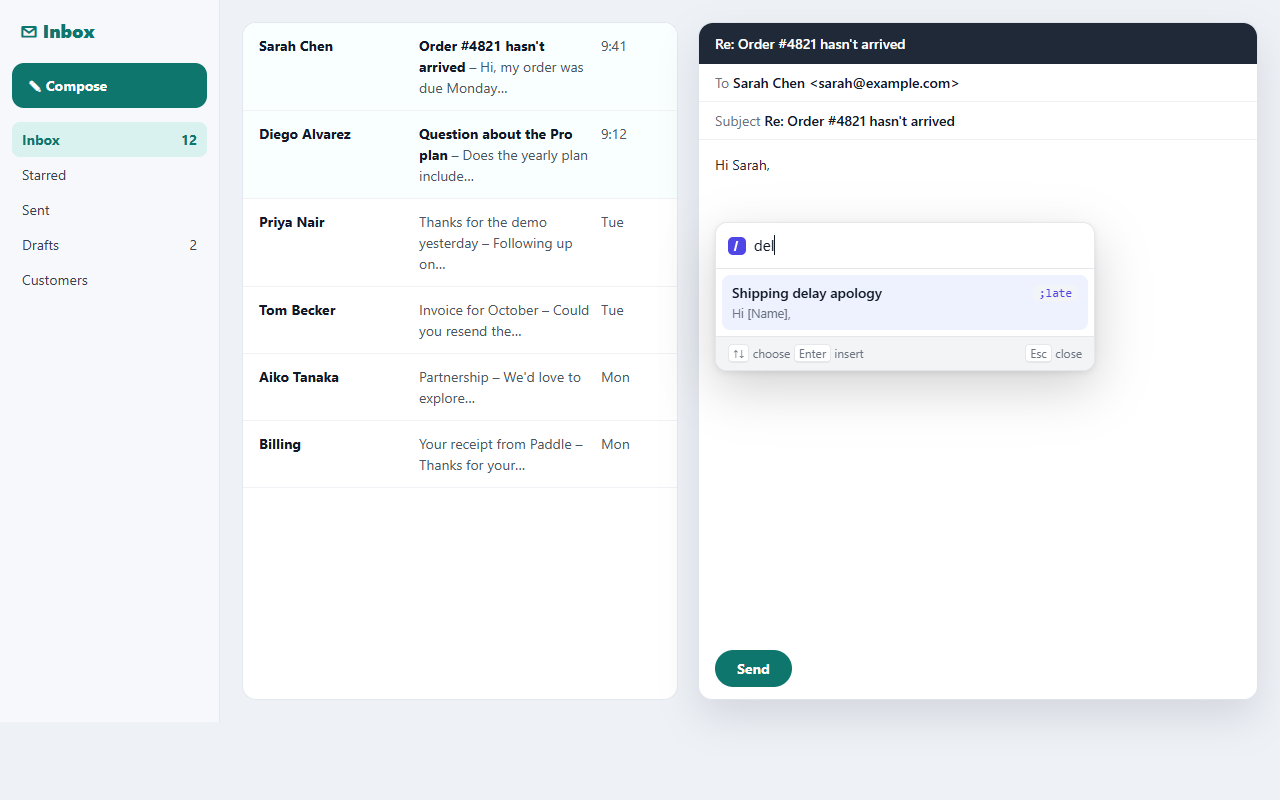
The Keyquill search palette open in a text box, listing snippets with previews

Everything you retype, one shortcut away

Support replies, sales follow-ups, recruiter messages, addresses, signatures, links. Write them once.

Shortcuts that just work

Type ;sig and it becomes your signature, instantly or after a space, your choice. Line breaks and formatting stay intact.

Search instead of remembering

Press CtrlShiftK or type ;; to find any snippet by name or text, and insert it right where you're typing.

Dates, times, clipboard

“Due {date+14d:D MMM}” writes the date two weeks from today. Drop in what you just copied, and choose where the cursor lands.

Fill-in forms Pro

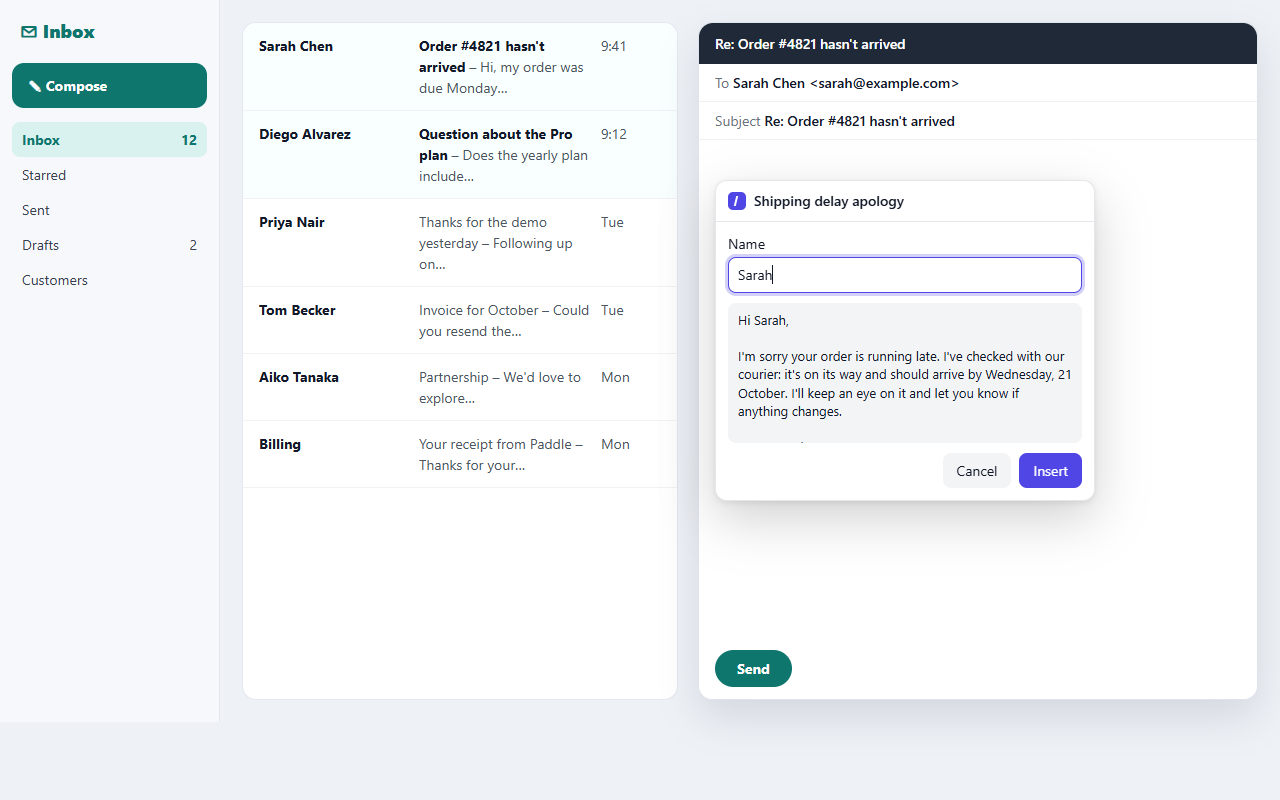
Personalise as you insert: names, dropdowns and notes in a small form with a live preview.

Never lose a snippet

Daily automatic backups, one-click restore, and export to JSON or CSV any time. Your snippets are yours.

Off where you want it off

Pause everywhere, or turn Keyquill off for specific sites. Password and card fields are always ignored.

Personal, not robotic

With Pro, a snippet can ask for the details that change: the customer's name, the plan, the next step. You see the finished text before it goes in.

A Keyquill fill-in form asking for a name and a plan, with a live preview of the message

A dashboard that stays out of the way

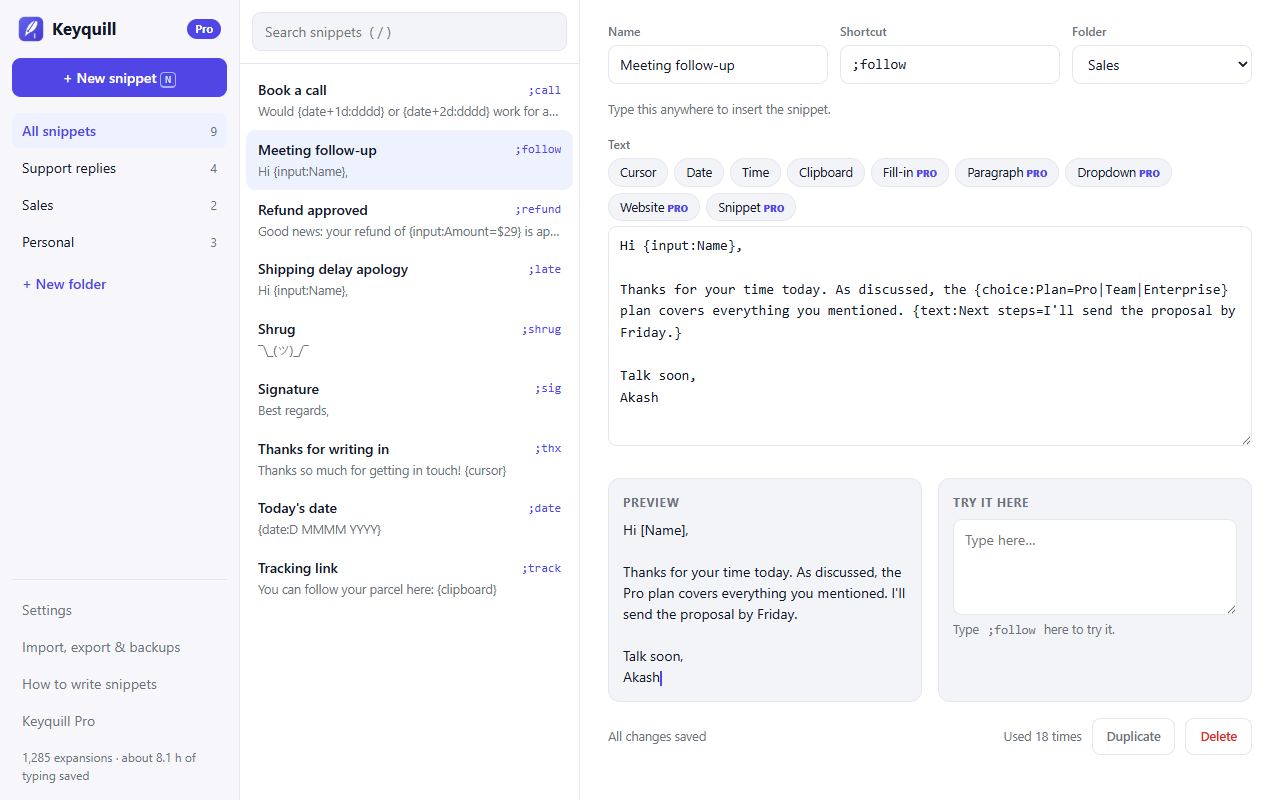
Folders, search, a live preview and a box to try each snippet as you write it. Changes save as you type, and Keyquill warns you if one shortcut would cut off another.

The Keyquill dashboard with folders, a snippet list, the editor, a preview and a try-it box

Works where you type

Keyquill edits text the way your browser does, through its own editing commands, never by rewriting the page. That's why it keeps working in modern apps and after Chrome updates.

Email & chat

Gmail, Outlook on the web, LinkedIn messages, WhatsApp Web, Slack, Teams and help-desk chat widgets.

Modern editors

Tested with the editors behind today's apps: rich text boxes, ProseMirror/Tiptap, Lexical and Quill, plus React-style forms.

Anywhere else

Plain text boxes, iframes and web components. Not yet Google Docs, which draws text on a canvas: use the palette and paste there.

Switching from Magical, Text Blaze or TextExpander?

Import your snippets in a minute. Keyquill reads CSV and JSON exports and converts fill-in fields from Text Blaze and TextExpander automatically.

Unlimited, actually free

No 20-snippet cap, no 5-uses-a-day limit on dates or clipboard. The free plan never shrinks.

No account, no upload

Snippets live in your browser. Nothing to sign up for, nothing synced to someone else's server.

Easy to leave, too

Export everything any time, and cancel Pro in one click from your receipt. We'd rather earn you every month.

Pricing

Unlimited snippets are free forever. Pro adds fill-in forms and the power tools.

Free

$0
  • Unlimited snippets and folders
  • Search palette and popup
  • Dates, times, clipboard, cursor
  • Import, export and daily backups
Add to Chrome

Pro

$24 / year

or $2.99 / month, or $49 once

  • Everything in Free
  • Fill-in fields, paragraphs and dropdowns
  • Website, page title and URL variables
  • Snippets inside snippets
  • 7-day free trial
See plans and pricing

Questions

Can Keyquill read what I type?
Only the last few characters before your cursor, inside the box you're typing in, to spot a shortcut. It never stores or sends what you type, and it ignores password and card fields completely.
Where are my snippets stored?
In your browser's own extension storage on your computer. There's no Keyquill account and no server holding your text.
Why does it ask to “read and change data on all websites”?
A text expander has to work in any text box you type in, on any site. Chrome words that permission broadly; Keyquill only uses it to insert your snippets.
Does it work in Edge, Brave and Arc?
Yes, in any browser that installs extensions from the Chrome Web Store.
Can I cancel Pro?
Any time, from your receipt email. See the refund policy.